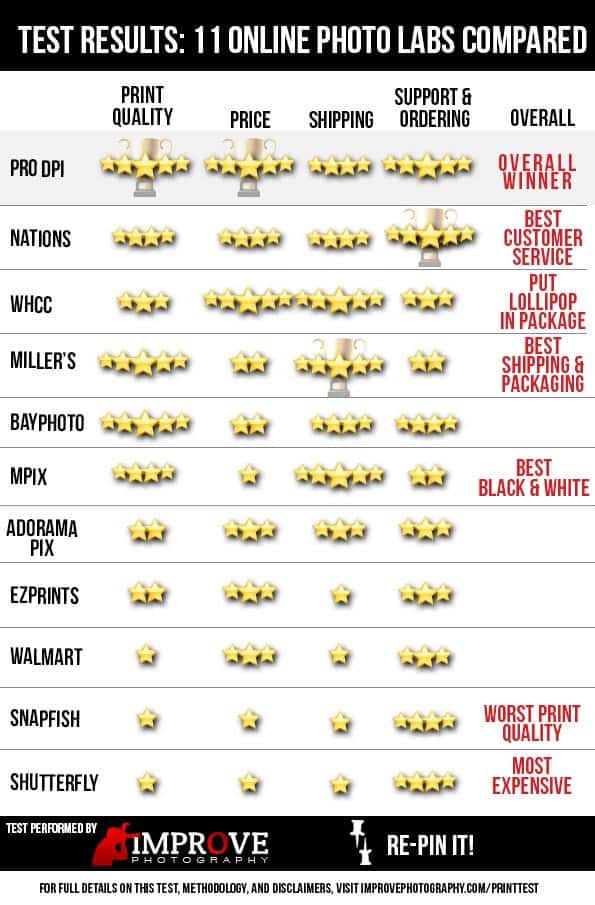
This is the most expensive post I've ever written. Over the last year, I've been asked dozens of times to do a comparison of the online photo printing labs to see who has the best print quality. I surveyed the members of our group on Facebook and found the 11 most popular online photo print labs and ordered the same 5 prints from each lab (which cost me over $250!).
Then, we performed a blind test to find the best print quality, price for the five photos of various sizes, and even called many of their customer support numbers.
UPDATE: After publishing this post, MANY MANY MANY of our listeners pointed out two things that need clarification: (1) I personally interviewed the owners of Pro DPI and they said amateur photographers ARE allowed to register and order from their lab. The requirement of “professional photographers only” when registering on their site is not accurate. The intent of that warning is to remind users that this lab is only for photographers and not consumers. Amateur photographers CAN use Pro DPI.
(2) A few users mentioned that the prices we quoted in our test are not the same prices they are seeing when ordering from the companies. This is because shipping charges will vary depending on where you live. We could only test the cost that we were charged by the companies to ship to our studio.
Below, you'll find the results. After the graphic representation, I list each of the online print labs and some notes about my experience in ordering from them. Although several of these labs offer affiliate programs where I could earn money by endorsing them, I have chosen not to accept ANY affiliate offers from these labs so that this test can remain impartial and unbiased.
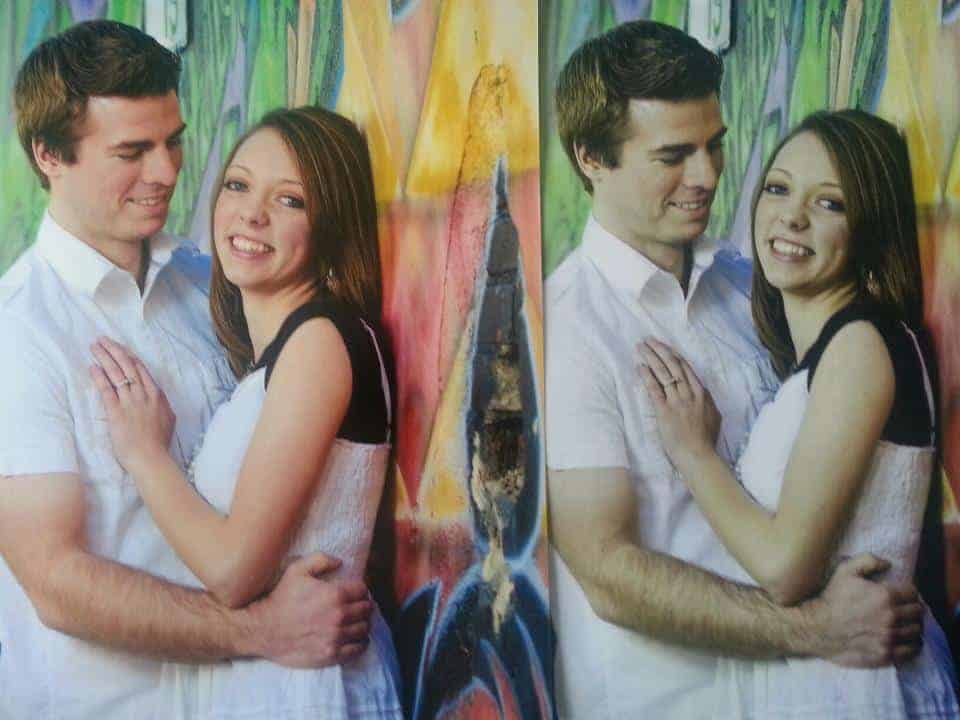
Pro DPI
Pro DPI was the overall winner of the test. This was especially surprising to me because they had THE CHEAPEST prices of all of the 11 labs we tested, and because I had never even heard of this company before polling our readers to determine which labs we should test.
Contrary to what their website says when attempting to create an account and order the first time, AMATEUR PHOTOGRAPHERS ARE ALLOWED to order from Pro DPI. We confirmed this in speaking with the owners of the company.
Pros: Pro DPI was the overall winner of the test. They had the best print quality, being selected first place in 3 of the 5 tests. That is significant because the top 4 or 5 prints from each test were often very alike, but the prints from Pro DPI stood out. Our order of 1 5×7, 4 8x10s, and a 11×14 cost only $12 including shipping.
Cons: The biggest drawback to Pro DPI is their website. The information is not laid out in a logical fashion, so it takes a while to navigate the site and do what you need to do. For example, it took me over 10 minutes to find the pricing for their prints, because they made it a PDF and put the information under the “Downloads” section of the site instead of in the navigation bar, where they should really put it because their prices are terrific.
The shipping speed for Pro DPI was worthy of 4 stars. We received the prints faster than most of the prints, but some companies shipped the prints faster.
Nations Photo Lab
Pros: The print quality from Nations photo lab is excellent. We were particularly impressed with the amount of detail in the prints, which were 3rd best overall in terms of print quality. Also, we like that they offer both a web-based ordering system or a traditional ROES system. That way, it is simple to order quick prints without firing up the ROES software. The prices at Nations were quite good. The order of 5 prints cost $15.51, which is only $3.51 more than the price leader.
Last, their customer support is top-notch. When I called in with a contrived customer support question, there was no robotic “press 1 if… press 2 if…” A real human being answered the phone immediately and was friendly.
Cons: We didn't run into any significant drawbacks to Nations Photo lab. The print quality was good but not quite as good as Pro DPI, the prices were good but not as good as Pro DPI, and the customer service was excellent. There was no significant drawback that put them in second place, it was more for the fact that pricing and print quality were slightly better at Pro DPI.
WHCC
Pros: Pricing from WHCC was excellent. Our order cost $12.55, which is only 55 cents more than the price leader. The main reason to choose WHCC is not for the price, though. It's about the lollipop. I was pleasantly surprised to find a lollipop (which my kids enjoyed) and a hand-signed thank you card in the box. It's about the little things 🙂
Cons: Our main concern with WHCC was the print quality. Customer service made me wait about 2 minutes on the phone before I got to talk to someone. The ordering process was reasonably fluid, but I had a difficult time changing my address.
Miller's
Pros: Miller's positions themselves at the high end of the market, so you get a few nice bonuses by choosing Miller's. They were the fastest shipping of all of the print labs, and their packaging was beautiful enough to impress clients when they receive their prints. Print quality was quite good, coming in at 2nd overall, and frankly there was little difference between the top 3 or 4 labs in each test.
Cons: The biggest drawback to using Miller's is the price–our order cost $19.60. Also, I had to wait 10 minutes for customer service to pick up the phone. While the customer service rep was not rude, I didn't find her to be overly friendly either.
Last, you have to APPLY for an account in order to make your first order, which made me feel like I was in a Blockbuster Video store in 1995. Little things like that annoy me, because it's such a waste of my time (this was also true of one or two of the other labs).
Bay Photo
Pros: Bay photo came in at 3rd place overall in the print quality test. Their black and white photo particularly stood out from the crowd.
Cons: The pricing of Bay Photo was not as good as the competition, costing $19.44 for the prints that I ordered.
MPIX
Pros: Print quality was quite good, and MPIX narrowly defeated Nations Photo for the title of Best Black and White Print. MPIX is a the consumer-oriented division of Miller's (mentioned above).
Cons: The biggest drawback to MPIX is the price–our order cost $23.16, which is almost double what our order cost at Pro DPI.
Adorama PIX
Pros: The ordering system is easy to use. I was anxious to test out Adorama Pix, because they are the lab that I most frequently used before the test. But now that the test is complete… I'm switching to Pro DPI.
Cons: Adorama PIX performed at a mediocre level on virtually every test. Their prints were never in the bottom of the pack, but they weren't even close to the quality of the top-performing labs.
EZ Prints
Pros: Ordering prints was easy and fast.
Cons: The cost was $17.58, which is about average for all of the labs involved in the test. Print quality was sub-par.
Walmart
Note that we ordered our prints from Walmart online and had them shipped to us. This was not an order from a local Walmart.
Pros: Pick up in store or have them shipped.
Cons: Print quality was dramatically worse than many of the labs. Our order cost $16.96, which was surprisingly $4.96 more expensive than the cheapest lab.
Snapfish
Pros: Ordering was fast and easy.
Cons: Friends don't let friends order from Snapfish. I had always thought that Snapfish and Shutterfly were the cheapest places to order prints, but I was surprised that they were two of the most expensive companies. Our order at Snapfish cost $20.74. The print quality from Snapfish was shockingly bad when compared to the other labs. Also, they shipped some of the prints in a tube, which made them curl up (not exactly presentable for a client).
Shutterfly
Pros: Ordering was fast and easy.
Cons: Much like my review of Snapfish, Shutterfly performed very poorly in our testing. Our order cost $27.08, which is more than double the price of the lab with the best print quality–Pro DPI. Frankly, there wasn't anything to like about these prints when compared to the other brands. It was a disaster.
Methodology in Performing the Test
Our labs were selected by the members of our group. We did a poll and asked which online photo print lab they used most often. This meant that we were testing high-end labs like Miller's, as well as labs that are generally not considered professional. While it may not seem fair to compare a consumer print lab to a professional lab, we found out from the test that the consumer labs like Snapfish and Shutterfly were two of the most expensive labs! So testing the most popular labs instead of only the “pro” labs turned out to be quite interesting.
When ordering prints from the companies, we did what we could to use the same brands of paper between all of the companies, the same finishes, etc. We ordered 5 prints from the labs. The prints were in a variety of sizes from 5×7 to 11×14. Some of the photos were portraits, some landscape, some black and white, etc. We also viewed the prints under controlled lighting conditions, and both Dustin and I each judged the prints according to two criteria: (1) What print looks the best? and (2) What print is most like the photo we ordered from our color-managed screen?
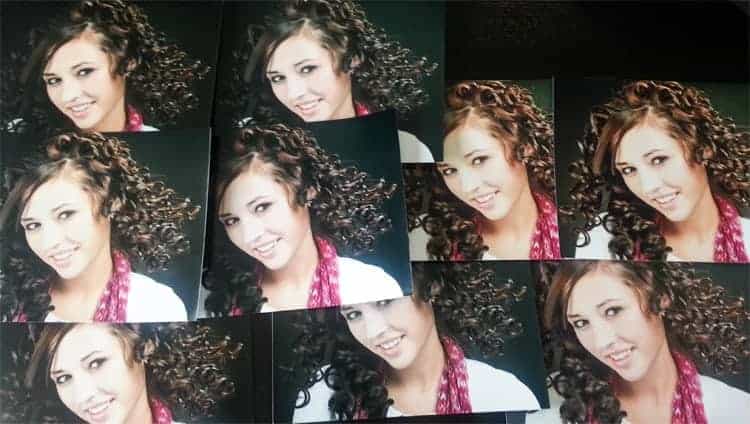
When all the prints were in, we wrote the name of the print lab on the back of each print and spread out the prints, face up, on a table. We then carefully looked at each photo (without knowing what company it was from) and ranked the photos from best to worst. This way, we were entirely impartial.
On a side note, I also brought the photos home from the studio and had my wife look at the photos. Her results in selecting the winning photos was nearly identical to the results that Dustin and I got. The confirmation of a non-photographer helped me to know that we were judging the prints on things that really make a difference and not overly-technical things that only photographers care about.
Tests of online print labs have been done before. Smugmug performed a test a few years ago, but their test was of the print quality for color-corrected prints. Most photographers do not use color correction because we like to be able to control all colors, exposure, and contrast ourselves. A good print lab will produce a print that is exactly the same as the file the photographer sends in. That way, I won't get surprised with how the lab chooses to change my work. Also, that test did not include the popular labs which are commonly used by photographers, but who do not market to higher end photographers, such as Snapfish, Walmart, and Shutterfly.
Disclaimer: While we put a significant effort into making this test accurate and impartial, we are frail human beings. A few of the labs didn't have the option to allow for non color-corrected prints or we couldn't find that option, etc. When posting information about the companies, we did not include all information about each company–only what stuck out to us. For example, we complained about Miller's requiring an application, but this was also true of some of the others. Our results may not be typical of all users, but we hope that this test at least provides some insight as you choose a photo printer that works for you.
I meant: “quality of a (basic, consumer) product sitting before the judges…. It’s not a comparison of product (types).” (Not meaning to be snarky.)
What I appreciate is that what some people miss is that ALL these labs are PROFESSIONAL LABS. They are all in the photographic product business, taking money for an expectation of quality. (It’s just that only some of them are geared toward pro photographers.)
All PROFESSIONAL labs should produce PROFESSIONAL quality products. (Same goes for any business.)
This comparison needs to be redone. It’s several years old and there are several scores that need to be changed.
@Whitney Conley – Several years old? Try one. I’m sure the test isn’t perfect, but unless you’ve done a head-to-head test printing the same photo from a bunch of different brands, I’m not really sure how you could say that some of the scores need to be changed.
Thank you for this post! Though I include permission to print with digital purchases many of my clients would still prefer to get prints through me. This post really helped! 🙂
Thanks for the info! Real info and not paid shilling. Just came home with my very first decent hummingbird picture and went to Walgreens and CVS – that were so color-cast orange or yellow. Thank for the info!
And both drug store monitors didn’t match own prints so I know it’s not my own monitor.
Check out the lousy print:
http://users3.jabry.com/ptosis/Images/PhotoDevelopNG.jpg
Can you a test with Costco on your next printing test.
Thank you VERY much for this review. I am just beginning to sell my photography and have tried out a couple of processors — I’m anxious to give ProDPI a try.
Thanks for doing the research!
I had never heard of Pro DPI until now. I can’t believe that I was considering Mpix before. Thanks for the review!
Great review and comparison, thanks for the info on some labs I was unaware of and will certainly explore for my photos as a hobbyist photographer. Different question, I just got married abroad and the photographers gave us our wedding photos in high res on DVD and we are free to print with any lab. We would like to upload the photos and share with our family/friends so they can independently order photos they would like. (but a with a quality above snapfish/shutterfly) As Pro DPI was your overall winner, would you recommend they are user friendly in this aspect, or I should go with another lab in your top picks —such as Nations, Miller, or Bay Photo that is more functional in this way? Thanks!
Thanks so much for doing this test.
I tried ProDPI, and while they had amazing prices, good customer service, fast shipping and great colors in their prints, they often sent me prints that were SIGNIFICANTLY underexposed. Some were underexposed by a full stop or more, despite using a calibrated monitor and adding extra brightness to the images before sending off.
I contacted ProDPI and they re-printed the photos and resent them, but they came to me only a slightly brighter. Oddly enough, I wanted to be sure so I printed the same images at Target and they NAILED the exposure but the colors were not as good.
Go figure. I loved ProDPI and it was a real shame this happened because I rely on shipping prints to people but I am just nervous now that my images will lose a great deal of impact from being so dark when I create colorful, bright, dramatic images
Thanks for the test. I wonder what the date is on your article?
Also, you say you ordered 5 prints from each lab, but in your description of what you ordered from the first printer you list 6 prints: “Our order of 1 5×7, 4 8x10s, and a 11×14 cost only $12 including shipping.”
I’d also vote for a comparison with Costco, CVS, Walgreens, etc…
I tried ProDpi after reading your article and could not navigate the site at all. I downloaded the Roes, then my photos, but never could find them again to order . There is nothing on that site that makes sense. So I am starting over and will try Nation next.
I had been using Shutterfly for years but in the past 3 their quality was so sub par I stopped bothering. Their prints are horrible. Thanks for the advice,
Thanks Jim, very helpful blog. My goal this month is to find an online service that with which I can create a portfolio website and have that company fulfill my orders for paper prints, picture framing and gallery wraps. After reviewing and finding what I believe was the best option, Zenfolio, I was told that the their suggested vendor to use for fulfillment in the USA is MPIX PRO which is owned by Miller’s. When I look at the MPIX Pro and Miller’s websites, both require photographs to be uploaded and profiled in sRGB. Even though they don’t use inkjet for the majority of printing. They use wet process for prints on e-paper and Fuji Pearl. Doesn’t this mean they are converting profiles again to CMYK?
Thanks Jim, this is very helpful. My goal this month is to find an online service with which I can create a portfolio website and have that company fulfill my orders for paper prints, picture framing and gallery wraps. After reviewing and finding what I believe was the best option, I looked at that their suggested vendor websites. They require photographs to be uploaded and profiled in sRGB. Even though they don’t use inkjet for the majority of printing. They use wet process for prints on e-paper and Fuji Pearl. Doesn’t this mean they are converting profiles again to CMYK?
I am uncertain why my previous post was deleted. It did not appear to violate any of your policies. However, I have deleted references to specific vendors and portfolio websites. Hopefully you’ll leave this posted so I can get a response.
I have been using WCW since 2011 and they have been my go to printer. They ship fast, their prices are decent and the photos are packaged well.
I will test a couple on the list though.
WHCC.COM. .. stupid phone.
I’ve used mpix since I live an hour away from their lab, so shipping is impeccable. However, I haven’t been very satisfied with some of their print quality…it seems touch and go. I’ll definitely be trying PRO DPI. Very helpful, thanks!
I made a drawing in Photoshop. Then I had Nations, Bay and Adoramapix print a canvas. Bayphoto had a much better quality than the rest. Next in quality was Adoramapix. Nations color quality was not too good.
Being new to the professional side of photography, I was needing a fair and honest analysis of which online photo labs to use that would produce good results for clients, so thank you for giving me a good overview of where to start.
I appreciate that you didn’t use any affiliate links on a comparison page, but a direct link to each of the companies websites would have saved me a quick Google search 🙂
Thanks again!
Matt
I cannot figure out how to order from ProDPI at all so I went with Nations, anxious to see how my son’s school pics turn out in print!