
Mac vs. PC. A debate that live on for years to come, but there is really only one that is best for photographers. Read on to find out which.
Oct 2015 Update: Be sure to check out the Windows Photo Editing SUPER Guide article for updated recommendations on the best low price options for PCs that will run Photoshop and Lightroom well – including what hardware is worth spending more money on and what is not!
Short Answer
It depends! I hate it when photographers do that to me.
OK, so bottom line is that either can work fine, but you have to spend the money to get the hardware you need.
Really this article is mostly for the PC user who are into photography.
If you are a Mac user, I doubt you are tempted to switch to a PC because you are a photographer.
In fact, you may be a Mac user because you are a photographer, and that is great.
You Mac users may be interested in the end of the article where I provide recommendations on which hardware upgrades are actually worth the money to make sure it can do a good job editing photos.
Now for you PC users. You are probably hearing constantly about doing photo editing on Mac.
You may be seriously tempted to get a Mac just because you hear so much about it from the photography community.
Maybe you are curious about if it really is better than the PC.
You may want to give it a try and determine for yourself, especially if it is time to invest in a new computer, but if things are going fine for you with editing your photos on a PC then my recommendation is to stick with what you know.
Why put a kink in your workflow and go away from what you know?
There, a photographer just gave you permission to use a PC for editing photos.
Instead of switching platforms from PC to Mac, your photography will improve much more by investing in lenses (check out my article recommending a “nifty fifty” lens as the second thing a beginner should buy), other equipment, and training (check out Jim and Darin’s awesome training courses at photoclasses.com).
Whether Mac or PC, I know how seriously frustrating it is to try and edit photos on a computer that doesn’t have enough power.
Maybe you are still using the computer you had before you started into photography, and it isn't up to the challenge.
If that's you, it is time to invest in a newer computer.
Read the long answer to go through reasons to pick one over the other, but really neither has a huge advantage and I think it makes the most sense to stick with what you know.
Check out the last two sections of this article for help in the specifications of what you need in a computer (PC or Mac) for a good photo editing experience.
Long Answer
I think it would be easier to discuss religion or politics than to take a side on the Mac vs. PC debate.
It is a debate that seems among photographers to be second only to the Canon vs. Nikon (or Sony, or Panasonic, or any of the other manufacturers).
The discussion is a little easier when you put a photography related slant on it, but it can still be fairly heated.
Still, as the hobbyist editor here at improvephotography.com my job is to take a view on these kinds of things and recommend something based on my own experience as well as what I have learned from other great photographers.
Remember this when you comment on the post, but please do comment.
At some point it is likely to become necessary to get a better computer than what you had when you started into photography.
Photoshop, Lightroom, and many other photo processing tools run much better when you have a good computer.
That machine you bought online for $200 last Christmas is simply not going to work well.
You can make due for some time, and you should for as long as you can.
But when processing a shoot takes twice as long as it should because you are CONSTANTLY waiting for your computer, or the display connected to your computer is not good enough (1080p HD is NOT enough), you will want to do something about it.
At the point when you have decided it is time and the next photography investment you are going to make is a new computer, think of it in the same you think about investing in a new lens and be prepared to spend as much in a lot of cases.
Check out the last part of the article here on recommendations of what the minimum hardware should be in both Mac and PC computers to make editing photos go well.
Why Should You Listen To Me?
Like the other articles I have authored for this website, I am writing this shortly after having gone through exactly this dilemma.
I realized very quickly that even a as a beginning photographer I needed to “post process” my photos on the computer (see my article here about why a beginner needs Adobe Lightroom) in order to make my shots look anything close to those I was seeing online.
Although I consider myself to be a fairly solid hobbyist photographer at this point, I am still relatively new to photography.
However, as an IT professional who has worked on and with computers for more than 20 years, I know computer hardware and software pretty well.
I have built computers, written software for computers, and as of writing this article my full time job is to architect solutions for very large computer systems for a large financial institution.
It is a subject area I have more qualifications to speak to than any other photography subject.
All that said, as I was trying to learn about photography any way I could (podcasts, YouTube, books, etc.) it felt like I was constantly being told that I needed a Mac in order to have photo editing go well.
It seemed like every YouTube video was done on a Mac, ever podcast was about how the new Mac was so awesome, and every photographer I talked to was using a Mac. It was a full on Mac attack, and I am a PC user.
I was editing my photos in Lightroom and had become frustrated that the PC laptop I was running it so … s l o w l y.
The laptop was dated and I knew that even if I wasn’t doing photo editing it was time to upgrade the hardware.
Given all of the hype from the photography community about Mac, I was wondering if I should dump all of my limited hobbyist photography budget on a Mac, or save some $$$ and stick with PC?
Hopefully my story sounds familiar to some of you, especially the beginners out there who are just getting started into photography.
If so, let me take you through a few questions you probably have.
Doesn’t Adobe Software Run Better on Mac?
Mac fanboys are probably going to disagree, but my experience has been that Adobe tools like Photoshop and Lightroom do not necessarily run better on a Mac vs. a PC.
I believe they used to several years ago, although I don’t have personal experience with it from before 2011 to say for sure.
In fact, before Apple switched the architecture of the Mac from PowerPC to Intel in 2006, Adobe had to write their software products very differently for Mac than for PC due to the architecture differences.
So I am pretty sure there really was something to this years ago, I just don’t think there is much to it today.
Like so many other things in life, you get what you pay for in a computer. There is a reason those cheap $200 PCs don’t really work that well for nearly anything.
If a PC has equivalent hardware to a Mac, it will run Adobe software products just as well as a Mac.
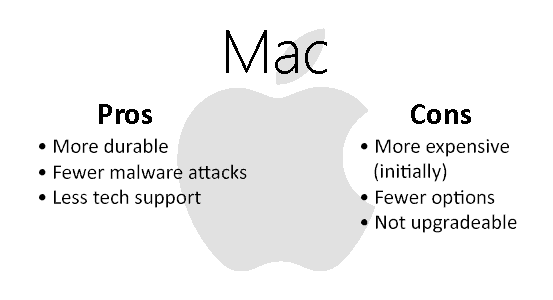
Really the biggest difference then is the cost (Mac is more expensive – initially) and personal preference of Windows vs. OSX – which can be extremely important.
If you are using a PC, I think you should stick with what you know best because I don’t think either has a big advantage over the other to run post processing software.
Don’t Macs Have Fewer Problems?
This is an area where I will give a very slight nod to the Mac, agreeing that in general they seem to have fewer issues than PCs.
Again, you get what you pay for, and there is a reason a Mac has more of a “premium” initial price than a PC.
Well, okay, it could be just because Apple can. No, Apple really does put a lot of work into making sure you have a good product in your hands when you fork over that much of your hard earned money.
I am truly convinced this is a real difference between Mac and PC. Unfortunately, it seems Apple is also becoming a victim of their own success and the quality control has gone down as the demand has gone up.
I often hear the argument come up very quickly that PCs are virus magnets whereas Macs are impervious to malware problems.
This is actually a topic very near and dear to my heart, but this isn’t an article on the topic of computer security, so let’s just say that there is more in it for the bad guys to write viruses for Windows.
So yes, you are more likely to have a problem with malware on a PC than on a Mac.
Can a PC work without major problems? Can a PC be kept clean from viruses? Do Macs ever have problems? Yes, yes, and yes.
Is this a reason to pick a Mac over a PC? Maybe. It may make sense if you are, or will be, doing photography professionally to save yourself from also having to be a PC technician by getting a Mac.
Just remember that Macs are still computers, and all computers have technical problems (after all the hardware in the Mac is the same as in some good PCs).
If you aren’t used to a Mac, a PC will be just fine, so long as it isn’t a bargain basement model. I think it makes a lot of sense to stick with what you know.
Aren’t PCs MUCH Less Expensive?
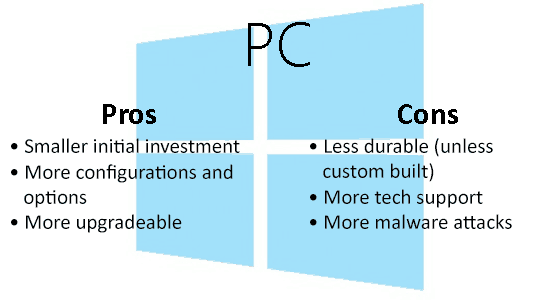
As I have alluded to earlier in the article here, in general PCs are less expensive than Macs – at least initially.
And that word “initially” is the key. The upfront cost of a PC that has almost exactly the same hardware can be as much as 50% less than a Mac.
This is why many PC fanboys will often refer to the “Apple Tax” when you talk about Macs.
But the truth is, unless you build a PC yourself, many of the PC models from the big box vendors like HP and Dell usually end up with some durability problems. They just don’t seem to last very long. Sigh.
The PC business is pretty much as cutthroat as it gets.
The margins have gone down to the point that the manufacturers have to sell a ton of them to make any money.
As they are building them they cut every corner they possibly can. It is worse for laptops than desktops. So you may be able to buy a PC for considerably less money than a Mac, but the Mac may last longer.
Will a Mac last long enough to make the higher initial cost worth it? Maybe. Depends a lot on your use. I think it is very similar to a car.
The same car will last much longer for the old lady driving to church on Sundays vs. a teenager.
To me the costs of a computer, the full costs from beginning to end, depends on how much you know about PCs and computer hardware.
Apple has chosen to make their computers much less upgradeable by anyone but them.
There are some good reasons to do so, but you can’t replace almost anything yourself very easily on many of the most recent models.
PCs on the other hand are much more open. Desktops a lot more so than laptops, but without too much trouble you can replace RAM, a hard drive, video card, and even a processor if you wanted to.
This can help you increase the hardware in your computer a bit more slowly like I did, where I added almost one thing at a time.
Takes some knowledge. Takes some time. But if budget is one of your key concerns you can minimize the up front investment.
If you are a beginner on a tight budget and are willing to be your own tech support then you can potentially save quite a bit of money on a PC and use the rest on photography gear!
But be aware, even though the number may be smaller than the up front cost of a Mac, it still takes a good sized amount of money to build a PC good enough for editing photos.
In the end I don't think the cost is all that different, at least not 50% less.
Desktop or Laptop?
Another trend I heard constantly from photographers was the use of laptops for photo editing.
Maybe this has to do a lot with the Mac line of computers having a sweet spot with the laptop form factor with their MacBook models.
Maybe there are just a lot more photographers who are constantly on the go and need a more mobile solution.
Whatever the reason, I think this is one you really need to consider carefully.
Desktops are quite simply better for editing photos. Yes, that is a blanket across the board statement.
Mac or PC, a desktop will run your editing software better than a laptop for less money.
MacBooks are very capable of running editing software if you make sure they have some essential upgrades (see the Mac Recommendations section below).
In fact, I think MacBooks are better suited than nearly anything from the PC world in the way of laptops.
That is changing a bit, the “ultrabook” line of PC laptops are finally competing fairly well with MacBooks and some of the stuff shown by PC makers at CES 2015 looks really interesting.
But going back to the cutthroat market of PCs I will bring up again how the vendors cut every corner they possibly can.
I have owned numerous PC laptops over the years and haven't been truly happy with any of them – especially for photo editing.
As good as a MacBook can be, I still recommend a desktop. Laptop screens are mostly terrible.
The MacBook retina screens are beautiful, but tiny. I have been shocked as I moved from a 24″ full HD (1920×1080) screen to a 30″ WQXGA (25650×1600) IPS screen at just how important this is for editing photos.
There is a reason creative professionals are willing to spend $2,400 on a super high quality Eizo monitor (check out monoprice.com for great monitors for far less money), it really matters.
In general you can get more CPU, more RAM, and more disk with less money in a desktop than a laptop.
Desktops also tend to last longer because heat is an enemy to computers and laptops are in such small packages their heat battle is going to be lost faster.
Think through this one very carefully. If you REALLY need mobility then you have no choice and should use a laptop, but I suspect that for many who claim this to be a requirement their laptop actually rarely leaves their desk and they would have been better off with a desktop.
PC Recommendations (early 2015)
When I was faced this dilemma I knew both the Mac and the PC pretty well, so my own choice actually came down to cost.
I knew how to build and maintain a PC very well, and could get a lot more hardware for the dollars by doing that.
I decided that for me it was better to minimize my investment on computer hardware, end up with a PC better suited for photo editing, and save the rest of the budget for other photography gear.
Even though I had a lot of experience with computers, I didn’t have a lot of experience with photo editing software and understanding what hardware actually makes a difference.
So I did quite a lot of research and was able to do some testing to see specifically what makes a difference.
Unfortunately there are too many PC manufacturers for me to recommend a specific model.
I don't think in the PC world there is actually all that much difference between them.
Some PC makers do better at customer support than others, although even that seems to change depending on who you ask.
I will say that I doubt any of the PCs you find in a box at the store are going to meet your needs. Go online and customize your order based on the recommendations below.
Here is my advice on what things are worth “upgrading” in a PC to make sure it will run Photoshop and Lightroom well.
Remember, this is very photography focused and is not a recommendation for a gaming or video editing PC (that would start off with maxing out the CPU and have some other differences).
The recommendations are in order of priority to help you decide how to get it configured as you are ordering from a PC maker or if you are brave enough to try a custom build (Be sure to check out the Windows Photo Editing SUPER Guide article for updated recommendations):
- 32GB of RAM. These photo editing software programs are memory hogs. As a software developer I think Adobe and other software companies are being lazy with their development practices because so many computer systems have high quantities of RAM, but they need every bit you can give them.
You can have things work pretty will with 16GB of RAM, and can get by with 8GB, but this is the first place I would max out a system configuration for a computer and get as much memory as possible.
- SSD hard drive. Abbreviation for solid state drive, an SSD is a hard drive that uses flash memory technology, similar to the memory in your phone and the SD cards you put in your camera.
They are quite a bit faster at reading and writing than the magnetic spinning hard drives, but they are also more expensive.
Quite a bit more expensive. But boy does this make a difference for photo editing, I almost made it my first thing on the list.
Get something 256GB or higher for the OS and programs, and to use as a “working” drive.
Then have a 1-4TB magnetic hard drive used for your longer-term storage (internal or external).
If SSD is too expensive, then at least making sure you have a magnetic drive that spins at 7200RPM (instead of the very common 5400RPM) will make a big difference. - Intel “Core i” processor. Kind of strange to think that the processor is so far down on a list of hardware specs, but in my opinion this is where it belongs for a decent photo editing machine.
This doesn’t mean you can ignore the processor. Won’t do you any good to have loads of RAM and a SSD drive if you don’t have a decent CPU.
Get the best one you can afford, but upgrade the other things listed previous to the CPU first.
I have been an AMD processor fan for many years, just like I love to cheer on the underdog in sports.
AMD has often had a better price to performance ratio over Intel, but when it comes to running photo editing software there is no question the software is heavily optimized for Intel processors.
Photoshop and Lightroom will still run on AMD, you won’t have a problem launching the application, but I think it is worth the money to go with Intel.
I also recommend at least a Core i3 processor. The software will run on a Pentium or Celeron process from Intel, but not nearly as well.
The Core i5 is a pretty big step up from the i3, and the Core i7 won’t break a sweat on this kind of work. - Large, high resolution IPS monitor. This was the last piece of computer equipment I upgraded, didn’t want to spend the money on a monitor, but it has made a HUGE difference in my photo editing.
I recommend a 27” or 30” monitor capable of 2560×1600 resolution (more than 2x more resolution than HD). That resolution is commonly called WQXGA. You will want to connect the PC to the monitor through DVI or DisplayPort, not through HDMI or VGA.
If you missed it earlier in the article, check out the monitors over at monoprice.com for really good ones at very reasonable prices. - Nvidia graphics. This isn’t because AMD (used to be ATI) graphics are bad. It is because Adobe doesn’t support anything but Nvidia very well on a PC.
It is improving, and I expect it to get much better in the coming years with the AMD graphics in the Mac Pro being supported so well, but for now you should avoid AMD video cards in your PC – whether laptop or desktop.
The graphics chipset seems to be a much bigger deal in Adobe’s video editing programs than it is for Photoshop or Lightroom, but if possible you should get a computer with a discrete (meaning one that is not built into the motherboard often called “integrated”) Nvidia chipset graphics card with 1GB of RAM. - USB 3.0. Your Mac friends will scoff at USB speeds when they have Thunderbolt for external storage.
There are a few PC motherboards with Thunderbolt built into them for PCs, but it has remained mostly a feature of Apple products and isn’t very well supported.
Still, USB 3.0 is so much faster than USB 2.0 that it is good to make sure you have a few on your computer.
Even with USB 3.0 I wouldn’t recommend editing your photos from an external drive, it just isn’t fast enough.
But using a USB 3.0 compatible SD card reader when importing the photos will make a big difference, as well as backing up or having your long-term storage on a USB 3.0 compatible external drive.
Note: At CES 2015 USB 3.1 and a new type of “C” connector was presented with speeds 2x faster than USB 3.0, theoretically equal to the speed of Thunderbolt.
Although there is still an architectural advantage to Thunderbolt that will likely make it superior. - 64 bit Windows 8.1 or 64 bit Windows 7 Professional. The latest and greatest OS from Redmond has taken a beating in the media.
They changed things up a lot. Judging by the direction Microsoft is taken Windows 10 they know they went too far towards a tablet friendly UI that didn't go well with PC users.
Still, once you get used to things a little it isn't a big deal.
I have been running my photo editing on Windows 8.1 for quite a while now and have no complaints.
Whether Windows 7 (recommend Professional in order to take full advantage of all the hardware) or Windows 8.1, you have to make sure you install the 64 bit version or you won't be able to use all the RAM you have in the computer.
This shouldn't be too hard as everything within the last 2-3 years has come with a 64 bit version of Windows. - No Hackintosh. I hesitate to even raise the topic, but I am imagining the comments coming, so I thought I should.
With Apple moving to the x86 hardware architecture, it is technically possible to run OSX on hardware not directly sold from Apple.
You can get specific components of hardware and then use some hacks to get OSX loaded up and have it function fairly similarly to a Mac without paying for a Mac.
It is true you can save some money here, but besides it being legally questionable (violates OSX terms of service and possibly the DMCA) it is difficult to maintain the hacks over time.
As new OSX updates come out the hacks frequently stop working until those smart hackers out there figure out how to get around it.
It simply isn’t worth the trouble. If you want a Mac, buy one.
If you are interested in building your own PC there are plenty of DIY build recommendations and instructions out there to make this very possible.
It sounds really intimidating at first because hardware has such confusing names and not everything can fit together.
But I can recommend Paul’s Hardware Channel and the PCDIY channel on YouTube along with the digital video editing DIY build recommendations from videoguys.com.
Mac Recommendations (early 2015)
You don’t have nearly as many different ways to configure a Mac as you do a PC, really just a few choices.
I thought I would break out my recommendations for Mac differently that I did for PC based on the model choices from least expensive (not cheap) to outrageous
Mac Mini
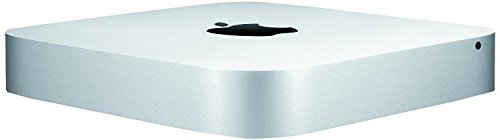
The Mac mini is the entry level machine from Apple really designed for people switching from a PC.
It is a tiny little desktop computer that packs quite a lot of punch into a small space, and will run Photoshop and Lightroom very well.
If after reading this article you think you might like trying a switch from a PC, this would be a really good way to try it out and see how you like the world of Mac.
Here is how I would configure it minimally for photo editing (about $1,000):
- 2.6GHz dual-core Intel Core i5
- 16GB 1600MHz LPDDR3 SDRAM (max)
- 1TB fusion drive (will probably want a thunderbolt external drive)
- Apple Magic Mouse
MacBook Air
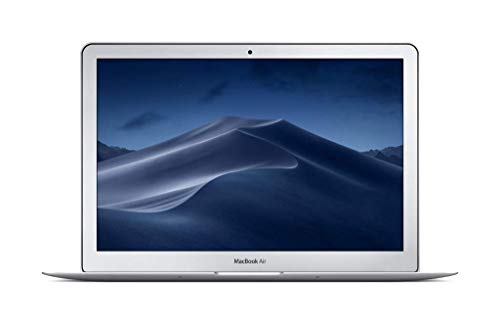
The entry level laptop from Apple is very nice as far as a laptop goes.
It gives you probably the ultimate in portability, but you will honestly get more power out of the Mac mini for less money.
Here is how I would configure it minimally for photo editing (about $1,300):
- 11 inch model
- 4GHz Dual-Core Intel Core i5, Turbo Boost up to 2.7GHz
- 8GB 1600MHz LPDDR3 SDRAM (max, can’t get 16)
- 256GB PCIe-based Flash Storage (going to need a thunderbolt external drive)
- Apple Magic Mouse
MacBook Pro
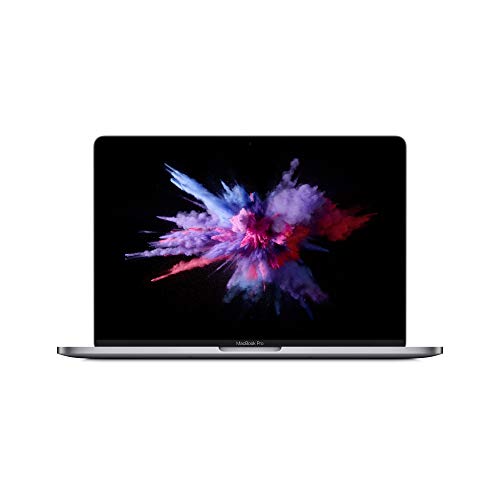
PC manufacturers are catching up (some of them shown at CES 2015 looked pretty nice) but the MacBook Pro is arguably the best laptop money can buy and is awesome for photo editing.
The Mac mini offers roughly the same power here, with 4x more storage, for less money, but here is the minimal configuration I recommend (about $1,800):
- 13 inch model
- 6GHz Dual-core Intel Core i5, Turbo Boost up to 3.1GHz
- 16GB 1600MHz DDR3L SDRAM
- 256GB PCIe-based Flash Storage (max, going to need a thunderbolt external drive)
- Apple Magic Mouse
You’ll notice that I recommend the Apple Magic Mouse with each one, that’s because the mouse is so good it is worth the money to get one.
I would also recommend that with either of the MacBook models you should also get a monitor to use with them when you are in your office.
Editing photos on those tiny screens, nice as they are (and they are incredible), is not great.
The Apple Thunderbolt Display would be a really good choice, but at $1,000 that pretty much doubles your cost. Yikes.
iMac

Apple just revamped the iMac in late 2014, making it one of the most desirable desktop computers for photo editing due to the 5k display.
As of the writing of this article there aren’t really 5k options available for the PC world, and I can confirm that even as a hobbyist a high resolution monitor is a VERY big deal.
Could you save some dollars and consider the previous model iMac? Absolutely.
You will still get a very good display with it, just not 5k. And the iMac has been a good machine very capable of doing photo editing for quite some time.
In fact, at this point I think it is a fair statement across all these Mac models to say that a previous generation model will work pretty well – just look for the RAM.
Here is my minimum recommendation for an iMac, which isn’t the 5k version (Jim reports that the difference seems TINY to him), but isn’t the smallest model either (about $2,200):
- 27 inch model (you could go down to 21 if it isn’t in the budget, but it really is worth it to go 27)
- 16GB 1600MHz DDR3 SDRAM – 2X8GB
- 1TB Fusion Drive (will probably want a thunderbolt external drive)
- Apple Magic Mouse (already included with an iMac)
Mac Pro
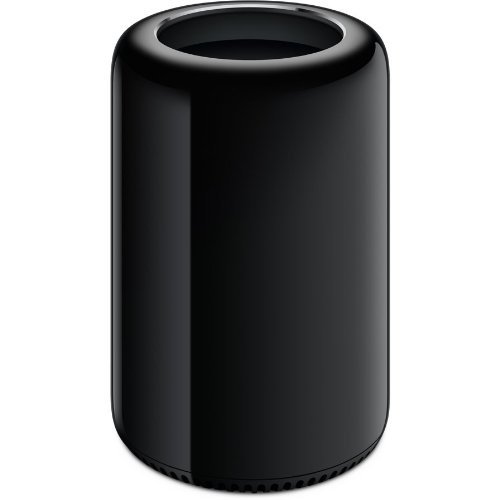
Now we enter the world of insanity for many. The Mac Pro is an incredibly powerful machine, but I don’t recommend it for a beginning photographer. It is something more for a power video editor.
Of course you could edit photos on it without the machine breaking a sweat, but it is overkill in my opinion and you are much better served to spend the cash on lenses.
I don’t need to provide a minimum configuration here because anything you order of a Mac Pro is going to rock Photoshop, Lightroom, and Premiere Pro.
The most inexpensive Mac Pro starts at about $3,000, which may seem not too bad when you compare it with the iMac because that is only $800 more.
Wait, did I just say ONLY $800?
But there is no monitor that comes with that, so you have to add that on top ($1,000 thunderbolt display).
So you could get an iMac and a MacBook Air for less than a Mac Pro and monitor, which would be better in my opinion.
Conclusion
A PC user doesn’t have to switch to a Mac in order to have a good experience editing photos.
I think it makes a lot of sense for a photographer to stick with what they know.
At some point it may make sense to go to Mac from PC, especially if you are a professional photographer, but it is really a matter of personal preference and neither has a big advantage over the other.
Just make sure you have enough hardware for the job in whichever you choose.
OK, so now let me have it in the comments below 🙂
I know this is an old article, but I am currently in the market to upgrade my Macbook Pro and I am very seriously considering moving back to a windows PC. The latest instalment of the Macbook Pro seems to be a step away from the design and photography market which is apples main market. For me to replace my MBP and have it perform all the tasks my current Macbook can do would require me to spend at least £1600 on the machine and then a further £300 on dongles or adapters. However I would be unable to plug all those adapters in at the same time. To make it worse, that price gets me a NEW MBP with specs the nearly the exact same as the one I already have making it fairly pointless to upgrade unless I push it to basically £2000 or more.
Yep. I agree Christoper. The 2016 MacBook Pro isn’t what I was hoping for from the update. No doubt it will still be a really good laptop for photo editing, but it could have been much better. Take a look at the Dell XPS 13 for a solid option in the PC world. The HP Spectre is another that looks worthy.
My first Mac I had for 7 years before it needed replaced, my second mac i had for 4 years and had to upgrade it, add storage and Ram. less then a year later and it has stopped working right. first it was turning off randomly and I was Turning it on in safe boot and now it just wont finish booting up and just shuts down. I live 90 minutes away from the nearest mac repair store which is not a official MAC Store. I am seriously considering getting a PC because at least someone near could work on or help me with problems. maybe my expectations of my computer are too high maybe it was just time to get a new computer but i was told with all the upgrades I had dome to my computer that it was like getting a new computer. that has not been my experience.
I have had my IMAC 24 inch since 2009 and has just recently slowed to unacceptable use. I will be buying a new IMAC this next month. I have gone through so many PCs prior to purchasing a mac. I was anti-mac through the 80s, 90s and 00s. It took 6 month of learning about Apple before making my purchase. I have never regretted it since. The PCs I have owned in the past all seemed to have problems with freezing up and not keeping up with new software. I have had no problem with my MAC until last year with a video card. This has always kept up with my photo editing. I would not consider myself a professional or even close to a true professional but I enjoy it immensely. It is still mostly a personal thing between MAC and PCs but I have had nearly no problem with MAC.
I love this article!
What recommendations would anyone give on a Surface Pro 4 vs. MacBook Pro?
Hi, I’m about to buy this model laptop (instead of the new 2016 15 inch macbook pro)
.Mid 2015 15 inch Macbook pro.2.8 GHz quad core i7 processor with Intel Iris Pro Graphics and AMD Radeon R9 M370X.
Mostly lightroom and photoshop work for still photography. Will be connected to an apple 23 inch Hd cinema monitor.
I’m hoping it will serve me well for the next 4 or 5 years.
My data is all on external drives( usb3).
Is this a good choice re. Power and function? Is the AMD card fine for this use?
Any comments appreciated
Cheers
Can’t say for sure that you will go 4-5 years with that James, but I use a 2015 MBP for my photo editing on the road and it does pretty well. I think if you want to use a laptop, the 2015 MacBook Pro is the very best option available. Better at this point than the 2016 MacBook Pro actually. I recommend NVIDIA cards over AMD, but you don’t have a choice with a MacBook Pro and Apple has worked with Adobe on it so that it will be good. If you really need a laptop, then you will be happy with this one, but a desktop is far better for photo editing. iMac or PC. Just a lot more power in desktop computers than even the very latest laptops.
Thanks for the prompt reply Jeff. It is really helpful. For the forseeable future I need a laptop to multitask, ( I need it to run a music software called Roon and Audirvana +, in a different location at times). Down the track an imac or similar plus alternate devices to run the music software are invisaged. Thanks again. I have my eye on a refurbished MBP on the apple site.
Cheers
James
Hey Jeff,
I loved this article. I am looking to get a new PC specifically for photo editing and found this article very informative. With all this information do you recommend a specific desktop and price range to spend? I am at a loss as to what to buy. I recently started looking to get back into photography and really need a good desktop that I won’t have to replace in a few years. My husband is also looking to go back to college to work toward his next degree and will also be using the computer so it would have to work for both of us. I wrote down all the must have’s you listed but was wondering if you had a specific computer in mind that had all these or they could be added to a certain computer. Please help!!!
Thank You,
Keira
Thanks Keira. Check out this article that is a little date at this point but has advice that still applies:
https://improvephotography.com/35216/windows-photo-editing-super-guide/
Let me start by saying that I hate Mac products, they are waaaaay overpriced and the OS makes no sense to me. I use both PC & Mac, I will never get used to the latter.
This is my PC configuration (I use it both for gaming & photo-editing):
Processor(Intel® Core™ i7-7700K Processor (4x 4.20GHz/8MB L3 Cache) – Intel® Core™ i7-7700K)
Processor Cooling(Corsair Hydro Series H90 140mm Liquid Cooler)
Memory(16 GB [8 GB X2] DDR4-3000 Memory Module – Corsair or Major Brand)
Video Card(NVIDIA GeForce GTX 1070 – 8GB – MSI ARMOR OC (VR-Ready) – Single Card)
Motherboard(MSI Z270 PC Mate — 3x PCIe x16, 1x USB 3.1 Gen2 Type-C, 6x USB 3.1 Gen1[Intel Optane Ready])
Power Supply(800 Watt – Standard 80 PLUS Bronze)
Primary Hard Drive(250 GB Western Digital Blue SSD — Read: 545MB/s, Write: 525MB/s – Single Drive)
Data Hard Drive(1 TB WD Blue Hard Drive — 64MB Cache, 7200RPM, 6.0Gb/s – Dual 1TB Drives (1TB Capacity) – RAID 1 Data Security)
2nd Optical Drive(24X Super Multi Internal DVD Rewriter Optical Drive – Black)
It simply overpowers my iMac, it just cannot keep up.
If you build a good PC configuration, you do not need a Mac. I paid about $1500 for my pc, 50% of what a 15″ Mac book pro costs.
Do not waste your money on Macs.
Great article. Sadly, my mid-2010 quad-core 27 inch i7 iMac has bitten the dust. Faulty nVidia GOU. Repair attempted but the mchibe just died. I can buy a top spec i7 PC with 28″ IPS monitor for around $1200 less for the equivalently-species Mac.
So goodby Apple. I loved that iMac.
But I cannot justify the price.
I really can’t.
As far as me being a member here, I wasn’t aware that I was a member for any days, truly. When the post was published I received a notification, so that I could participate within the discussion with the post, That would explain me stumbuling upon this post. But we’re certainly all members inside the world of suggestions.
amazing !!! good work. keep it up. thank you
Thank you for your honest weigh-in on both worlds! :). I have recently moved forward from hobbyist photographer to babystepping a business plan and must add that I actually like both MAC and PC, but for very different reasons. For this path, I will stick with a MAC. Upgrading is inevitable, however as far as quality of the hardware? My iMAC is a 2010 and works great… much too slow for what I’m dishing it, now, but for everyday things It’s still amazing and will remain in my office as a second/ emergency computer.
I hope I have offered some helpful insight and thank you again!
^Kimmie^
Hello! Your images look like it has been edited in Photoshop and your TEXT layers are under the other layer… And that’s bad. You should keep the TEXT layer on top or it will be like your images which the text does not look sharp.
Hope it helps!
There is a reason why I bought a Mac, it was not to be one of the cool kids that wanted the best of the best. No it was because of the music production I do on it. Hours and hours sitting in front of my Mac copying, pasting, moving, deleting, hour after hour just beating on my Mac in a endless assault to get my work done. That is the key part, my work. I work from home, it is great, but even if it is from home it is still work and it still needs to get done. So my Mac, I have it because it is fast, gets the job done and comes back for more.
But what happens when it doesn’t want to do those things anymore?
I move around massive amounts of information and yes even on the almighty Mac this can cause a problem after a while. Things fragment, programs get corrupted issues come up. My light speed Mac slows down to a crawl and all of the sudden I simply can not get any work done. Because I work from home there is no IT guy to call and ask to come fix it. No instead I have to figure out what is wrong. I am lucky, I did, but not after trying everything under the sun first and wasting countless hours looking for one program that can do what I needed instead of ten programs. One program to lead them all….okay that was a lame Lord of the rings reference, but that program was/is Detox My Mac. A simple to use program that did not just fix my issues, it put my Mac on overdrive again. A few clicks and my Mac was clean and ready to rock and roll again.
Read more here:- http://detox-my-mac.com?vhbshygdf398432
It seemed like every YouTube video was done on a Mac, ever podcast was about how the new Mac was so awesome, and every photographer I talked to was using a Mac. It was a full on Mac attack, and I am a PC user. Acer laptops give the best tools for photo editing. You can also install other tools because here get a high-speed processor and 2 GB graphics card, for more information about joining on Acer Customer Service, here find the best support for Acer related query.
amazing !!! good work. keep it up.
what about rec 709 and srgb stuff. my friend is getting into photography and her current TN panel is giving her problems (prints do not match her monitor).
i gave her a list of a few good IPS monitors that specd for photo/video editing. but now she is thinking of an imac. not too many articles talk about imac monitor specs in that regard.
how does the imac 21 and 27 inch compare to a something like the ben q SW2700PT or viewsonic VP2768 in regards to srgb and rec709
go on the nice man
likeeeeeeeeeeeee you
Way back in the day we used macs but the cost versus performance issues has mean’t that for the last few years we have been using windows based machines.
I’m aficionado photographer you make a point for beginners to buy the basic iMac computer then upgrades later because we are focusing on photography we are not have the skills to fix computer and time for photographer to focus on one thing I’m glad I read this information thanks again for doing this