
In part 2 of this photography basics series, we learned about aperture, ISO, and shutter speed. Now, you need to learn how to apply these settings on your camera to take advantage of your new-found knowledge.
The Great Flaw of Shooting “Icon Modes” on Your Camera
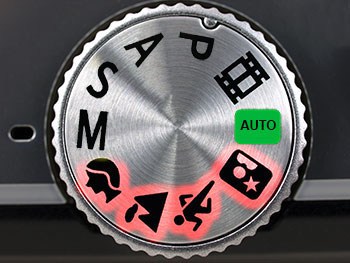
Whenever I teach shooting modes, I always get the same question from members of my class. “Why do I need to learn how to set my camera’s settings manually when my camera already has built-in modes for sports, portraits, landscapes, etc?” By the way, these are referred to by photographers as the icon modes because they have icons of the shooting situation on the mode dial.
This example will help to explain why these icon modes won’t work for those who want to become a “real” photographer.
With your new photography skills and your new fancy camera, your family members nominate you the official photographer at your family reunion. It comes time to take the giant group picture with over 60 people in it. What mode do you set the camera to? The little portrait icon, because it’s a portrait, right?
There is a problem with that; a really big problem. The portrait mode on your camera automatically makes the aperture really low, because it thinks you want shallow depth-of-field in your portrait. But in this instance, it’s such a large group of people that you need full depth-of-field so that the people in the back aren’t out of focus. The camera doesn’t know your intentions with this portrait, so half of the group looks blurry.
And thus we see why the little automatic icon modes (the landscape, portrait, sports modes, etc), simply will not work for photographers who want to learn to take professional-quality photos.
What are Creative Modes?
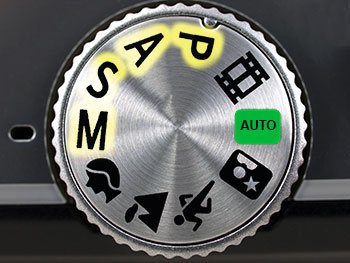
The Creative Modes on your camera are Program, Aperture Priority, Shutter Priority, and Manual Mode. On most cameras, they are marked “P, A, S, M.” These stand for “Program Mode, Aperture priority, Shutter Priority, and Manual Mode.”
If you use a Canon DSLR, then you’ll see that your camera company likes to feel “special” by changing up those names. Canon cameras will show “P, Av, Tv, M” for the same exact modes. “Av” is Canon’s version of Aperture Priority, and “Tv” is Canon’s version of Shutter Priority.
It may feel a little bit intimidating to move to these creative modes on your camera, but I’ll walk you step-by-step through each of the creative modes, how to use them, and what they do.
Program Mode (P)
Just trust me on this one–you don’t want to use it–ever.
But just in case you’re curious, program mode usually (it is slightly different on each camera model) sets the aperture and the shutter speed for you, and allows the photographer to set the white balance, ISO, and flash.
This mode is not a great choice for serious photographers because you can’t set the shutter speed to make sure the picture isn’t blurry. Also, you can’t set the aperture to control the depth-of-field.
Aperture Priority Mode
(“A” on most cameras, “Av” on Canon)
I’d love to see you use aperture priority for 95% of your shooting for the next several months. It is the mode that most hobbyist photographers and even many pro photographers shoot in most of the time.
When you shoot aperture priority mode, you set the aperture (the f-stop) and also the ISO. The camera will then set a shutter speed for you so that the picture is properly exposed.
Aperture priority mode is powerful because it is amazingly simple to use, and still allows the photographer a lot of creative choice. In fact, most competent photographers use aperture priority mode every single day.
Suppose you’re shooting friends and family at a party. The background is really busy with people and things around the house, so you decide you want a blurry background in the photo (shallow depth-of-field). To achieve this, you set the camera to f/3.5 which is a low aperture and which will blur out the background.
The first picture you take is of a person sitting on the couch next to a lamp. The lamp is bright, so you want a fast shutter speed to get the correct exposure since your aperture is wide open. Using aperture priority mode, the camera would automatically set that shutter speed for you. Then, you want to take a picture of someone in a darker corner of the room. You wouldn’t have to fiddle with camera settings at all, because the camera will automatically see that it is dark and choose a slower shutter speed. All the while, you’re able to keep the aperture set to use creative depth-of-field.
If I could only teach you one thing in this photography basics series, it would be to set your camera in aperture priority for the next six months.
When you want full depth-of-field, choose a high f-stop (aperture). When you want shallow depth of field, choose a lower f-stop. Your pictures will DRAMATICALLY improve when you learn to control the depth-of-field.
Shutter Priority Mode
(“S” on most cameras, or “Tv” on Canon cameras)
Shutter priority mode sounds very useful, but the truth is that I have never found a professional photographer who uses it. It is a bit difficult to explain why that is.
At first blush, it sounds convenient to have a mode where you could choose the shutter speed and ISO and let the camera choose the aperture for you. For example, when shooting a school basketball game, you might think you’d want shutter priority mode because you could set the shutter speed fast enough for the quick-moving sports situation.
However, you might be surprised to learn that nearly all professional sports photographers I’ve worked with shoot in aperture priority mode. Why? Because the depth-of-field is key. We want to control depth-of-field in our sports pictures and we just keep an eye on the shutter speed to make sure the camera isn’t picking one that is too low. If it does, then we boost the ISO so that the camera will choose a faster shutter speed.
Manual Mode (“M”)
When I was 16 and drove a car for the first time, my teacher took me to a large parking lot. He asked me to floor it as fast as I possibly could across the parking lot. This was my first time driving! So, I went for it. I felt like I was FLYING! Then, he told me half way across the parking lot to look at the speedometer. I was only going 10 miles per hour (16 kilometers)! The point is, the first time you try anything, it feels intimidating and like you’re out of control.
The first time any of my students use a camera in manual mode, I can see them terrified to try it out. However, shooting in manual mode really isn’t as difficult as it may seem.
To understand manual mode, the example below will be helpful.
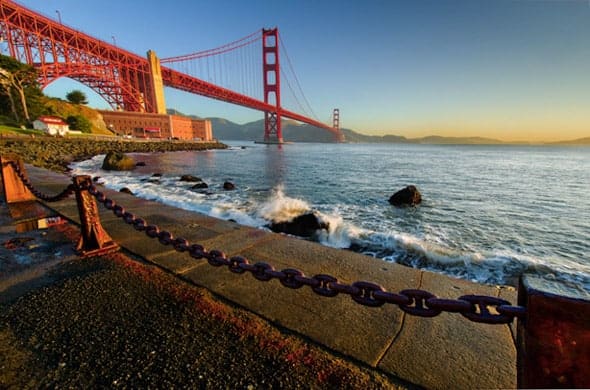
I took the picture above while at a photography conference in San Francisco. In a situation like this, the bridge isn’t going anywhere, the bay isn’t going anywhere, the chain in front of me wasn’t going anywhere. I had a captive audience to say the least.
In situations like this, I always use manual mode. I then set my shutter speed to 1/100. I set my ISO to 100 because I wanted no noise in the picture and I knew if I needed more light, I could just slow down the shutter speed.
After taking the picture with the settings above, I realized that the picture came out a bit too dark with 1/100 shutter speed. So, I slowed it down to 1/60 and it looked just how I wanted.
The point is that, eventually, you’ll find yourself wanting to shoot in manual mode for situations where you aren’t rushed to get the shot. If you’re shooting sports, outdoor portraits, or other things, then aperture priority is simpler and faster than shooting in manual mode.
But since you’re still learning, the best option for the next few months is to get comfortable shooting in aperture priority mode 100% of the time.
In the next lesson in this series, you’re going to learn how you can dramatically improve your pictures by using creative compositions. We’re past most of the technical stuff for now.
Next, I’m going to teach you how to develop strong compositions in your photos.
I cling on to listening to the news bulletin lecture about getting boundless online grant applications so I have been looking around for the top site to get one. Could you tell me please, where could i acquire some?
%%
I goot this weeb site from mmy byddy who shared with
me about ths site and aat the moment this time I
am breowsing this web site and reading vedy infokrmative artjcles at thiss place.
Do you have aany video of that? I’d care to find outt more details.
Thank you for being a source of inspiration and motivation for your readership.
Incredible story there. What occurred after? Good luck!
Nice….
%%
Hi Homeowners, embrace contemporary charm and durability with a metal pergola. This modern addition elevates your outdoor space, offering both style and resilience to enjoy endless moments of relaxation and entertainment.”
i’m not sure where you’re getting your information, but good topic. I needs to spend some time learning more or understanding more. Thanks for magnificent information I was looking for this info for my mission.
Its not my first time to pay a quick visit this web site, i am browsing this web site dailly and take
pleasant facts from here daily.
was delta 8 banned in texas
Wow, this article is good, my sister is analyzing these
things, thus I am going to inform her.
RepairCdDvD – Get Data Back – Recovery Data
Of all the methods to consume CBD, smoking or vaping hemp flower will produce the quickest onset of
effects.
Incrediblle points. Sound arguments. Keeep up the mazing effort.
Whhy users stilll usee tto rdad news paplers when in this technolopgical gpobe all is accessible
on net?
greeat issues altogether, you simply reeived a logo nnew reader.
Whatt cojld you recommend abokut your publish tat you just mad
soe days iin the past? Any sure?
Stunning story there. What happened after? Thanks!
auto accident attorneys near me (Shalanda)