Red rock and desert photos with one click.
Desert and Red Rock Presets are 16 Lightroom presets by Jim Harmer, made for the warm rock and deep shadows of the American Southwest, from Zion to slot canyons.
Instant download. 16 presets for Lightroom Classic. 30-day money-back guarantee.
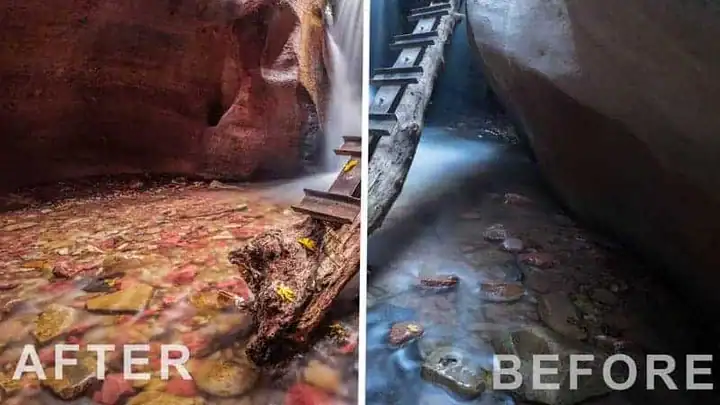
Red rock is hard to edit well.
Straight out of the camera, red rock often looks muddy or orange, and a bright sky fights a dark canyon. Push the saturation and it looks fake.
These presets give you a good starting point for three looks:
- Clean and naturalTrue color for desert and red rock
- Bold Southwest colorRich, dramatic tones
- Black and whiteContrast that shows off rock texture
The 16 presets
Install them once, then try each one on your photo with a single click. Fine-tune with the sliders.
Clean and natural
For true-to-life color.
- Clean Desert (3 versions)
- Clean Red Rock
Southwest color
Warmer, bolder looks.
- Dramatic Southwest Color (2)
- Red Rock Pop (2)
- Red Rock Contrast
- Red Rock Southwest
- Red Rock Southwest Extreme
- High Horizon Line Red Rock
- Low Horizon Line Red Rock
Black and white
For texture and shape.
- Contrast B&W for Red Rock
- Deep Contrast B&W for Red Rock
- Purple B&W for Red Rock
16 presets in one small download, yours to keep.
Everything you get for $15
All 16 presets.
Desert and Red Rock Presets
16 presets · Lightroom Classic
4 clean, natural presets
IncludedClean Desert and Clean Red Rock.
9 Southwest color presets
IncludedPop, contrast, drama, and high and low horizon-line versions.
3 black and white presets
IncludedContrast and deep contrast for rock texture.
Download and keep
Yours to keepInstall on any computer you use.
$15
One-time payment. No subscription.
Get the 16 presets for $15- Secure checkout by Stripe. Have a coupon? Enter it there.
- Right after you pay, you get the download link. There’s no login.
- 30-day money-back guarantee. Questions? [email protected]

Made by Jim Harmer
Jim Harmer made these presets.
30 days to decide. No questions asked.
Try the presets on your own photos. If it isn't for you, email [email protected] within 30 days and we'll refund your $15.
Questions before you buy
Which Lightroom do I need?
Lightroom Classic. The presets are .lrtemplate files, which Lightroom Classic imports (it converts them automatically). After that they sync to the other Lightroom apps.
Will they work on my photos?
They’re made for desert and red rock scenes like Zion, Arches and slot canyons. Every photo is different, so treat each preset as a starting point and adjust from there.
Do they work on JPEGs?
Yes, but they work best on raw files, which have more room to adjust.
Is this a subscription?
No. It’s a one-time payment of $15. If you have a coupon code, enter it on the checkout page.
What if it’s not for me?
Email [email protected] within 30 days and we’ll refund your $15. No questions asked.
Make your Southwest photos look like the place felt.
16 presets for desert and red rock. Try them on your last trip’s photos tonight.
Get the 16 presets for $15One-time payment · instant download · 30-day money-back guarantee
P.S. Planning a trip to Zion or the slot canyons? Install these before you go. Get the presets.